
Why FBI Background Checks Need the FBI Watermark to Be Federally Authenticated
The U.S. Department of State doesn’t apostille the words on an FBI report. It authenticates the FBI’s own marks — the CJIS watermark and a division official’s signature. If your copy of the PDF doesn’t show the watermark, there’s nothing for the State Department to authenticate.
We check every FBI report for the watermark and signature before it goes to Washington.
The Short Answer
According to the U.S. Department of State, the FBI authenticates all fingerprint search results by placing the FBI watermark and the signature of a division official on them. Those two marks are what make a page of results the FBI’s document rather than just text.
They are also what the State Department needs. Its apostille requirements call for an original or certified copy with a legible official signature, the official’s printed name and title, the agency’s seal and the date of issue. On an FBI report, the watermark is the agency’s seal and the division official’s signature is the signature. Lose either one and the request fails before anyone reads a word of your record.
The rule in one line: whatever you send for federal authentication — the FBI’s mailed paper or a print of the FBI’s PDF — the CJIS watermark has to be visible behind the text.
What the Watermark Looks Like
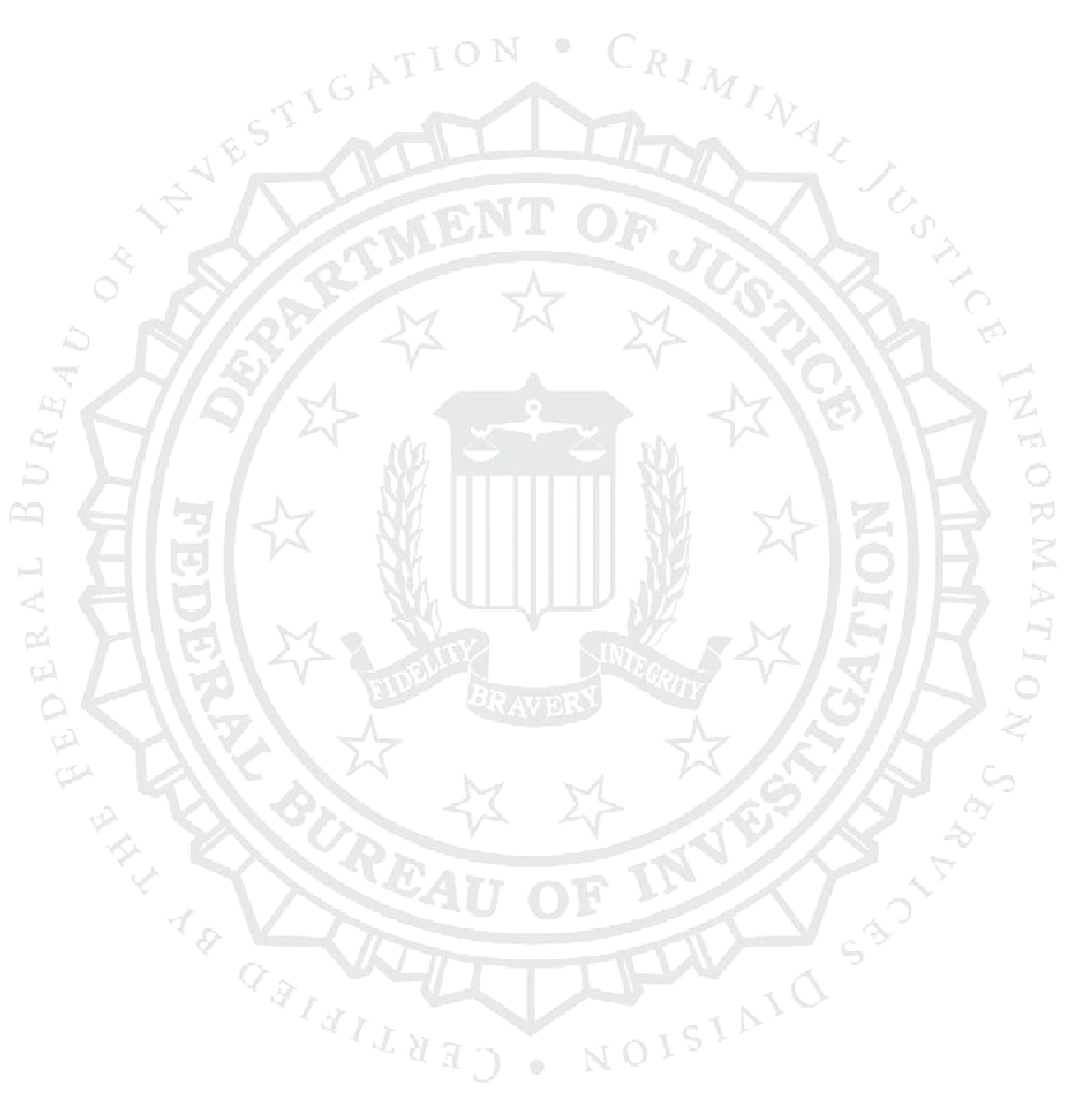
The watermark is the FBI seal — the Department of Justice and Federal Bureau of Investigation lettering around a shield, with the motto Fidelity, Bravery, Integrity — inside an outer ring that reads Certified by the Federal Bureau of Investigation • Criminal Justice Information Services Division.
That outer ring is the important part. It ties the page to the Criminal Justice Information Services (CJIS) Division, the part of the FBI that provides individuals with copies of their criminal history records, known as Identity History Summaries.
Because it prints in light gray, the watermark is also the easiest part of the report to lose between your inbox and the State Department.
Why the Watermark Decides Federal Authentication
An apostille — and the authentication certificate used for countries outside the Hague Convention — certifies where a document came from: that a real official signed it and that the seal is genuine. It doesn’t evaluate the contents. For an FBI report, the State Department can only certify that origin if the FBI’s own marks are on the page to check.
A copy without the watermark has lost the FBI’s seal. It may contain every word of your results, but so could a page typed by anyone. That is why a watermark-free printout, screenshot or photocopy can’t be federally authenticated, even when the record on it is perfectly clean.
No one can add it back. Only the FBI places its watermark on results. A notary stamp doesn’t replace it, and the State Department says a federal document that has been notarized is no longer valid for authentication.
How the Watermark Goes Missing
| What happened | Why the watermark is at risk | What to do |
|---|---|---|
| Printed from a phone, tablet or browser preview | Built-in previews don’t always render a PDF exactly as issued. | Print from a desktop PDF reader. Accurate Biometrics, an FBI-approved channeler, tells applicants that Acrobat Reader is required to open and print its results PDF. |
| Screenshot or photo of the screen | It captures pixels at screen resolution, and a light-gray watermark can wash out. | Print from the PDF file itself. |
| Draft, toner-saver or economy print mode | These modes lighten or skip pale elements. | Print at normal quality. |
| “Fit to page,” cropped or resized | The page no longer matches what the FBI issued, and the edges of the seal can be cut off. | Print at actual size (100%). |
| Re-saved, compressed, edited or “printed to PDF” | The file is no longer the one the FBI issued. | Keep and print the original download. |
| Photocopied or scanned | Copiers and scanners can drop light gray, and a copy isn’t the issued document. | Print again from the original file. |
| Channeler receipt or cover page | It’s the channeler’s page, not the FBI’s results, so it never had the watermark. | Send the FBI’s results document itself. |
Check Your Copy Before You Send It
Find the seal
Look behind the text. The CJIS watermark should be clearly visible, not faded or cut off.
Find the signature
A division official’s signature, printed name and title should all be legible.
Find the date
The report must show the date it was issued.
Check what’s been added
No notary stamps, handwriting, highlighting or staples through the text.
Compare with the PDF
If the seal shows on screen but not on paper, reprint from a desktop PDF reader at actual size.
If You’d Rather Have Paper From the FBI
You can skip printing altogether. According to the FBI’s eDO privacy impact assessment, applicants receive a hard copy response if they submit fingerprints on a paper card or request the hard copy option on the eDO website. Some FBI-approved channelers, including Accurate Biometrics, also offer results printed on watermarked security paper. See our directory of FBI-approved channelers.
The rule doesn’t change with the format: what you send for authentication must carry the watermark and signature exactly as the FBI issued them, never a copy of that paper.
How We Handle FBI Reports
- Watermark and signature check: we review every FBI report before filing and tell you right away if either is missing or unreadable.
- Federal apostille: hand-delivered to the State Department’s Office of Authentications, where walk-in drop-offs are processed within 7 business days. $120 flat rate per report, government fee included.
- Destinations outside the Hague Convention: an authentication certificate plus embassy legalization. See Apostille vs. Authentication.
- Translation: certified translation when the destination requires it.
For the full process, see our FBI Background Check Apostille page and Does an FBI Background Check Need to Be Notarized for Apostille?
Frequently Asked Questions
Why does an FBI background check need the watermark to be apostilled?
The FBI authenticates its results by placing the FBI watermark and a division official’s signature on them, and the U.S. Department of State authenticates those marks. Without the watermark, the copy has no FBI seal for the State Department to verify.
The watermark shows on my screen but not on my printout. What should I do?
Print again from the original PDF file using a desktop PDF reader, at actual size and normal print quality. Don’t print from a phone preview, a screenshot or a re-saved copy of the file.
Can I send a screenshot or a phone photo of my results?
No. A screenshot or photo is a picture of the page, not the FBI’s document, and the light-gray watermark often doesn’t survive it. Print from the PDF file itself.
Can a notary or an apostille service add the watermark?
No. Only the FBI places its watermark on results, and anything added later would be an alteration of a federal document. The State Department also says a notarized federal document is no longer valid for authentication.
Does a report from an FBI-approved channeler have the watermark?
The FBI’s results do. A channeler’s receipt, cover letter or summary page does not, so make sure you send the FBI’s results document itself. Some channelers also offer results printed on watermarked security paper.
Do I need the mailed hard copy instead of the PDF?
Not necessarily. We submit clean prints of the FBI’s PDF when the watermark and signature reproduce intact. If you’d rather have paper from the FBI, choose the hard copy response on the eDO site.
Does the watermark mean my record is clean?
No. The watermark and the apostille both speak to where the document came from, not what it says. A report that shows a record is authenticated the same way as one that shows none.
Does the watermark matter for countries outside the Hague Convention?
Yes. Those countries need an authentication certificate from the State Department followed by embassy legalization, and the State Department starts from the same FBI watermark and signature.
The Bottom Line
The CJIS watermark is the FBI’s seal on your results. Keep it visible — print the original PDF properly, or use the FBI’s paper — and the State Department has what it needs to authenticate your report.
Send Us Your FBI Report
We’ll confirm the watermark and signature, hand-deliver your report to the State Department and return it apostilled — $120 flat rate per report, ready in 7 business days (excluding Fridays and federal holidays).
Sources: U.S. Department of State, Criminal Records Checks, Prepare Document for an Apostille Certificate and Request Authentication Services; U.S. Department of Justice, Privacy Impact Assessment for the FBI eDO Service. Facts checked October 8, 2026.
